显示标签为“Xhorse XM Smart Key”的博文。显示所有博文

2021年9月13日星期一

Xhorse VVDI Key Tool Max Program XM Smart Key Pro does not Work Solution

Q:

Working on a Toyota Tacoma 2016 smart key board 2110 using VVDI Key Tool Max, Only one option makes the remote work but none has the proximity/smart feature working, Toyota Rav4 2018 the same issue.

Xhorse VVDI Key Tool Max Program XM Smart Key  01Xhorse VVDI Key Tool Max Program XM Smart Key  02


Here Xhorsevvdi engineers answer:

Sometimes a smart key generated successfully may not fully function the vehicle: remote doesn’t work, doesn’t have smart feature or even one button fails etc., which needs us to modify smart key’s values manually.


Possible reason:

Xhorse XM smart keys are universal keys, not particular for one model like Toyota Tacoma 2016, so we need to customize XM smart key to find correct values for each car.


Solution:

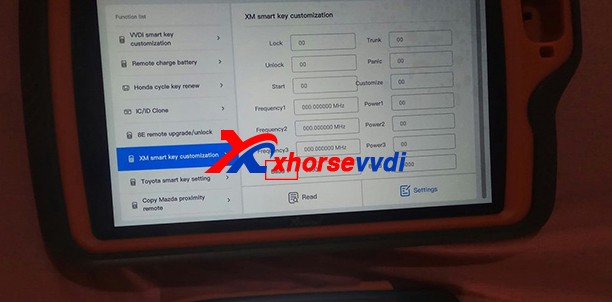
XM smart key customization by VVDI Key Tool Plus or Key Tool Max.

Path: Special Function>>XM smart key customization

Xhorse VVDI Key Tool Max Program XM Smart Key  03

1)Modify Frequency

Sometimes the frequency options given to us is slightly different from that of the smart key to be programmed.

So read out the frequency “A” that your vehicle wants by Xhorse devices, then read original XM smart key frequency “B” and set “B” to “A”.

Xhorse VVDI Key Tool Max Program XM Smart Key  04


2)Modify Baud

Read key’s Baud, increase it by 400, and test if it works perfectly.

If not, add Baud again by 400 until it works well. (The last two numbers may vary automatically, which is normal.)
Xhorse VVDI Key Tool Max Program XM Smart Key  05


Customer feedback:

I had exactly the same problem with a Corolla 2018, and I just made the changes on the ID and frequency as well and everything works...


Thank Tyler and Raphael for sharing!

Hope this could help!

More info, please check

https://www.xhorsevvdi.com/


2021年5月7日星期五

How to use Xhorse VVDI2 Program Toyota Smart Key?

How to use Xhorse VVDI2 and TOY.T Universal Smart Key to generate Toyota XM remote.


Look at TOY.T Universal Smart Key :

How to use Xhorse VVDI2 Program Toyota Smart Key  01


Open Xhorse VVDI2 software, click on "Prepare proximity remote".

How to use Xhorse VVDI2 Program Toyota Smart Key  02


Read the following attentions and follow it:

Attention 1: This type require special Xhorse XM Smart Key, the procedure require internet support.

Attention 2: it needs some bonus points for each XM Proximity remote first use.

Attention 3: Toyota Proximity remote (XM special) don't have bonus points.

Input XM proximity remote to device coil before continue.


After reading the above attention, click on "Yes". 

How to use Xhorse VVDI2 Program Toyota Smart Key  03

How to use Xhorse VVDI2 Program Toyota Smart Key  04


Synchronize with server.

Please wait...

Query result...

Calculating, require 5 seconds, query after 10 seconds... (Cannot be cancelled)

Prepare remote - XM proximity mode...5

How to use Xhorse VVDI2 Program Toyota Smart Key  06


Enjoy!


TOY.T Universal Smart Key is available here:

https://www.xhorsevvdi.com/wholesale/xhorse-smart-key-for-toyota.html

Xhorse Toyota Smart Key  07 
Xhorse  Toyota Smart Key  08


Source:http://blog.xhorsevvdi.com/how-to-generate-toyota-xm-remote-with-vvdi2-and-toyt/


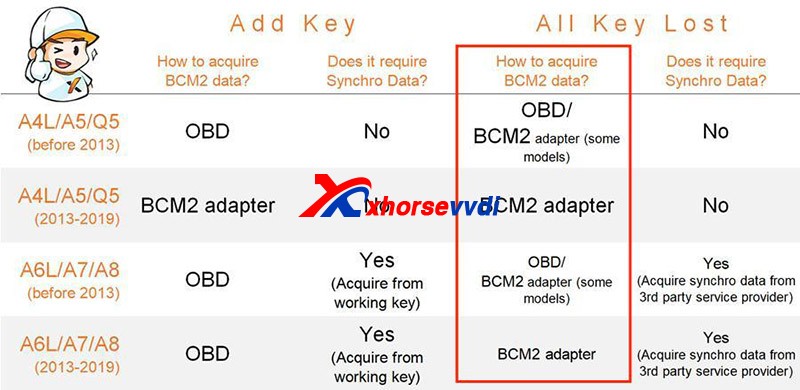
How to distinguish whether Audi BCM is an encryption Type

  Recently released   Xhorse BCM2 Solder-free Adapter   allows users to read encrypted Audi BCM2 module, but how to know if it’s a locked ve...